CC2540 / CC2541 Get Real MAC Address (for iphone)
Android Phone Test
BLE Peripheral Device
Check Android Phone BLE
MAC Address
Use Android App to Scanning
the device
Connected
BLE Peripheral to check
the Connect device MAC
iPhone Test
Check IPhone BLE MAC
Address
Use IPhone App to Scanning
the device
Connected
BLE Peripheral to
check the Connect device MAC
Add function and command
to get real MAC address
Turn off IPHONE
Bluetooth device and BLE Peripheral will into Advertising
Turn on IPHONE
Bluetooth and try again
Use command to get
real MAC address
Central:CC2540
Peripheral :CC2541
Function Block
Device Init Down
Central Start Discover
Central Connented
Central Write Data to Peripheral (20 Byte)
Peripheral Display Central Write Data
Peripheral Notification Data to Central (20 Byte)
Central Display Peripheral Notificatiom Data
CC2541 Function Block
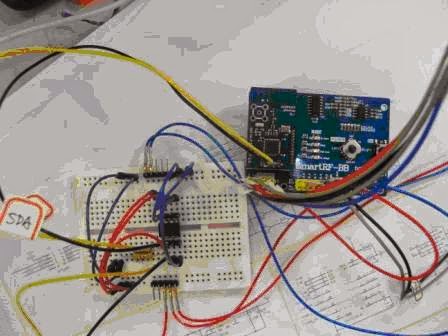
CC2530 I2C implemented by GPIO
CC2530 I2C Pin Define
P0_0: IIC-SCL
P0_1: IIC-SDA
CC2530 USART CMD
CMD_I2C_BYTE_WRITE (Success return 0x01、Fail return 0x00)
CMD_
I2C_BYTE_READ (Success return 0x01、Fail return 0x00)
CC2541Ex I2C Pin define
Circuit Diagram
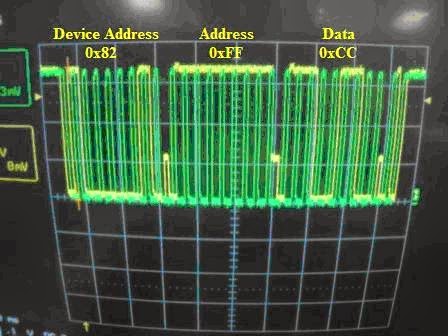
I2C Write/Read
Operations
I2C Write
FEAAFFCC (Address:0xFF;Write data:0xCC)
I2C Read
FEBBFF (
Read address 0xFF;Read data form slave device)
CC2541
Function Block
CC2541Ex I2C Pin define
Circuit Diagram
USART
Command Format
IIC
Byte Write
IIC
Byte Read
CC2530 8051 USART porting to CC254x
1. Create a new project
2. Project → Option setting
3. Copy CC2530 8051 example code to new project directory
4. Modify,Compiler and program to CC254x
5. USART will send "HELLO_CC254x"
CC2540/CC2541 BLE Development Board ( CC254xEM / SmartRF / SmartRF-BB)
1. CC254xEM / SmartRF / SmartRF-BB combined into BLE-SmartRF-CC254x development board
2. BLE-SmartRF-CC254x compatible with TI development board
CC254xEM
SmartRF
SmartRF-BB


.JPG)




.JPG)
.JPG)
.JPG)